How It Works
Crypto Wallet Screening allows merchants to screen a wallet address or an entity name against selected databases and watchlists.
To start a screening request, the merchant provides a wallet address or entity name, selects the database(s) to screen against, chooses a risk engine, and configures the match score. The merchant can also enable ongoing AML monitoring and ongoing adverse media monitoring.
Once the request is submitted, Shufti screens the provided wallet address or entity name against the selected sources, such as sanctions lists, warning lists, and adverse media, based on the merchant’s configuration.
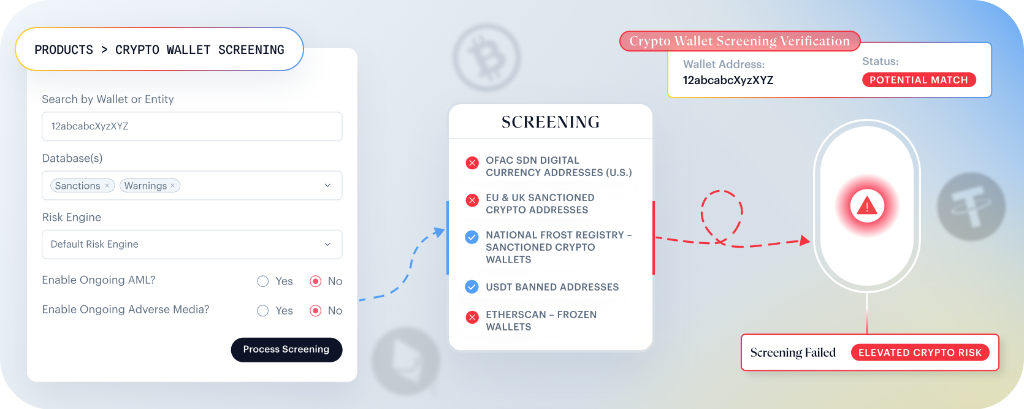
Screening Flow
- Enter a wallet address or entity name.
- Select one or more database(s).
- Select the risk engine.
- Configure the match score.
- Enable or disable Exact Match.
- Enable or disable:
- Ongoing AML monitoring
- Ongoing adverse media monitoring
- Click Process Screening to submit the request.
- Shufti processes the screening and returns the result.
Screening Sources
The screening is performed against the database(s) selected by the merchant. Based on the enabled configuration, Shufti screens the submitted wallet address or entity name against relevant sanctions lists, watchlists, warning lists, and adverse media sources. The screening setup is configurable, allowing merchants to choose the relevant databases, define the matching threshold, and enable ongoing checks as needed.
For crypto wallet screening, supported sources include, but are not limited to:
- GOV.UK Sanctions
- Office of Foreign Assets Control (OFAC)
- National Bureau for Counter Terror Financing (NBCTF)
- USDT Banned Addresses
- Etherscan
These sources help identify wallet addresses and related entities that may be associated with sanctions exposure, blocked or frozen wallets, regulatory actions, or other risk indicators.
Match Score
The match score defines how strict the screening should be.
- A lower score allows broader matching
- A higher score applies stricter matching
- The supported range is 0 to 100
If Exact Match is enabled, the screening applies a stricter match condition to the provided input.
Ongoing Monitoring
Ongoing AML Monitoring: When enabled, Shufti periodically monitors submitted wallet addresses and entities against updated sanctions and warnings lists. Any newly discovered match triggers an automated alert.
Ongoing Adverse Media Monitoring: When enabled, Shufti periodically tracks new adverse media linked to the submitted wallet address or entity name on an ongoing basis.