Overview
Shufti Crypto Wallet Monitoring screens a crypto wallet address or transaction hash against its on-chain activity and returns a risk report. A screening can run once as a Wallet Risk Report, or repeat on a schedule set by the Merchant as Wallet Monitoring. Both use the same screening and produce the same report.
How It Works
- Merchant submits the search. The Merchant submits a wallet address or a transaction hash, together with the network it belongs to.
- Shufti traces the funds. Shufti traces the on-chain history of the address. It follows the source of funds (where incoming funds came from) and the use of funds (where outgoing funds went), across direct and indirect (multi-hop) transactions. A wallet address search traces the wallet's history. A transaction hash search traces the origin and destination of that transaction.
- Counterparties are identified. Traced addresses are matched to known entities, such as exchanges, mixing services, gambling platforms, and darknet marketplaces, through wallet attribution and address clustering. Each counterparty is assigned a risk category.
- The wallet is scored. The wallet or transaction receives a risk score from 0 to 100 and a risk level: High, Medium, Low, or Clean. Each score comes with a short explanation of what drove it.
- Shufti returns the report. The report is saved against a unique reference ID and listed in the back office under Reports > Crypto Reports > Wallet Risk Reports. A notification is shown for each new report until it is opened.
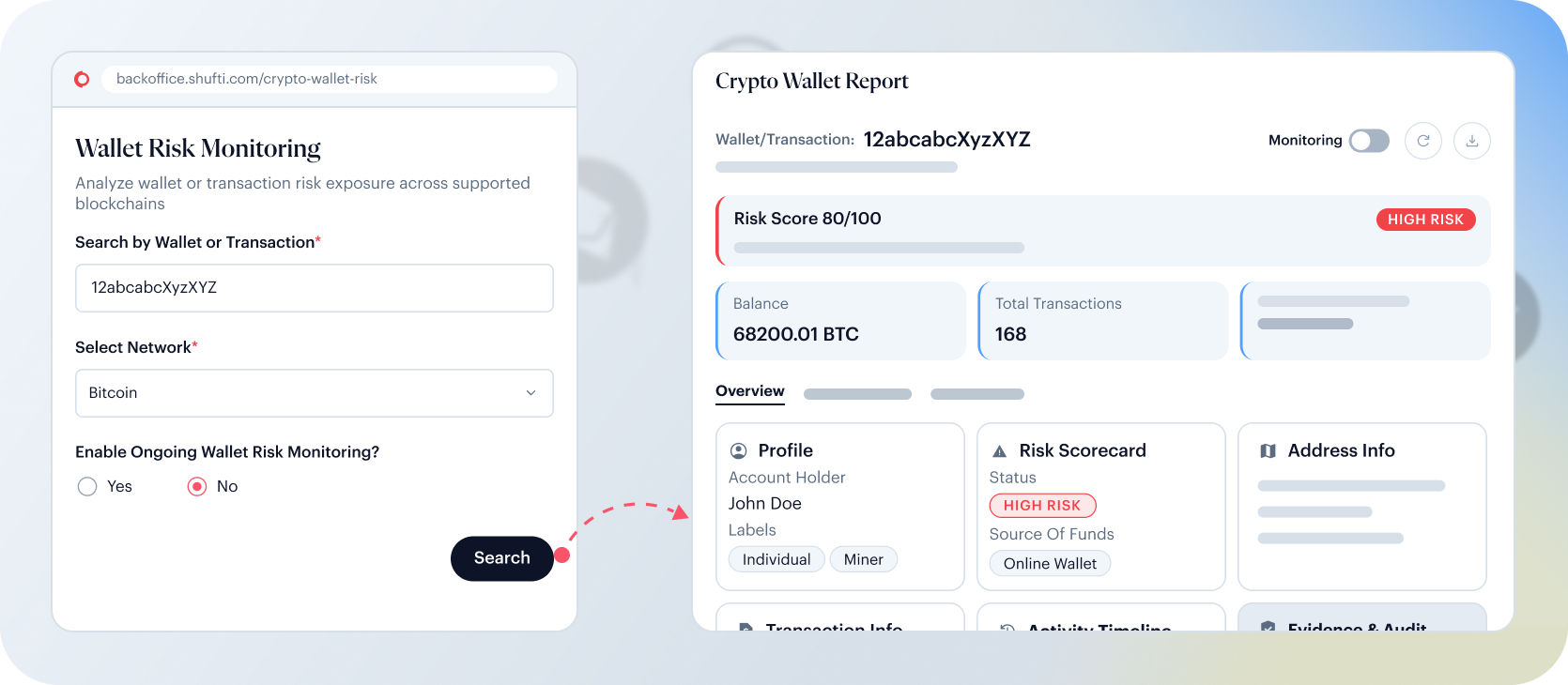
Ongoing Wallet Monitoring
- Merchant enables monitoring. When submitting a wallet address, the Merchant enables ongoing monitoring and sets a schedule: a frequency (No Repeat, Daily, Weekly, Monthly, or a custom Interval), a date and time, and an optional note. Monitoring can also be switched on later from an existing wallet report.
- Initial screening. Shufti screens the wallet and generates its first report.
- Scheduled re-screening. Shufti re-screens the wallet on the chosen schedule.
- Risk changes are flagged. If a re-screening changes the wallet's risk score, the Merchant is alerted, and the change is recorded in the report's activity log.
- Merchant manages monitoring. The Merchant can update the schedule or note, pause or resume monitoring, or remove the wallet from monitoring. Removing a wallet cannot be undone. Each wallet's monitoring status (Active, Paused, or Completed) is shown in the Wallet Risk Reports list.
Network Coverage Tiers
Coverage spans 21 blockchain networks in two tiers, including major stablecoins such as USDT and USDC on the networks where they are issued. Data goes back to the first transaction on each network. Both tiers return the same report fields. The tier sets how many transactions a report covers and how far funds are traced.
Advanced Networks
- Networks: Bitcoin, BSV, Ethereum, BNB, Litecoin, TRX, Avalanche, Cardano.
- Transactions per report: The 50 to 1,000 most recent transactions, depending on the network and monitoring status.
- Trace depth: Up to 20 hops.
- Tracing stops at: A known or labelled address, a smart contract, an unhosted wallet with no further outputs, an unidentified organisation (a cluster of over 1,000 addresses, or a single address with over 1,000 incoming and over 1,000 outgoing transactions), the maximum trace depth, or a transaction under 0.01% of the total funds moved.
- Wallet Monitoring: Available.
Essential Networks
- Networks: Polygon, Solana, Arbitrum, Base, XRP, Moonbeam, Polkadot, TON, Optimism, XLM, Aptos, Worldcoin, Tempo.
- Transactions per report: The 2 most recent transactions (1 incoming and 1 outgoing).
- Trace depth: Up to 5 hops.
- Tracing stops at: A known or labelled address, an address with over 1,000 transactions, or the end of an unlabelled trail.
- Wallet Monitoring: Not available.
Risk Scoring
Every wallet or transaction screened receives a risk score from 0 to 100. The score reflects the wallet's exposure to risky counterparties found in the on-chain trace, and maps to one of four risk levels. Each result includes a plain-language explanation of what drove the score.
Risk Levels
- High: Direct or close exposure to sanctioned entities, darknet marketplaces, mixing services, or other severe risk indicators.
- Medium: Exposure to moderate-risk counterparties, or indirect links to higher-risk activity further along the transaction chain.
- Low: No material exposure to known risky or illicit entities identified at the time of screening.
- Clean: No risk exposure detected at the time of screening.
The risk score and risk level describe the wallet as a whole. Each risk category in the exposure breakdown also carries its own severity, High or Medium, which is set independently of the overall score.
A wallet that cannot be scored is returned as not scored, with the risk level Unknown.
Risk Categories
Every score comes with a breakdown of the wallet's exposure by risk category. Each category carries a High or Medium severity and is shown with its share of exposure and the amount behind it.
Direction of Funds
Exposure is shown in three views, so it is clear whether the risk sits upstream, downstream, or both.
- Combined: Total exposure per category across incoming and outgoing funds.
- Source of Funds: Where the wallet's incoming funds came from.
- Use of Funds: Where the wallet's outgoing funds were sent.
The risk categories include, but are not limited to:
|
|
|
|
|
|
|
|
|
|
|
|
|
|
|
|
|