How it Works?
- Enhanced KYB (search based)
- Enhanced KYB (document based)
- Enhanced KYB (document purchase)
Enhanced KYB delivers in-depth business verification by querying official registries, trusted data sources, and proprietary databases in real time. It supports configurable verification modes, flexible search inputs, and document-based validation, making it suitable for businesses operating across multiple jurisdictions globally.
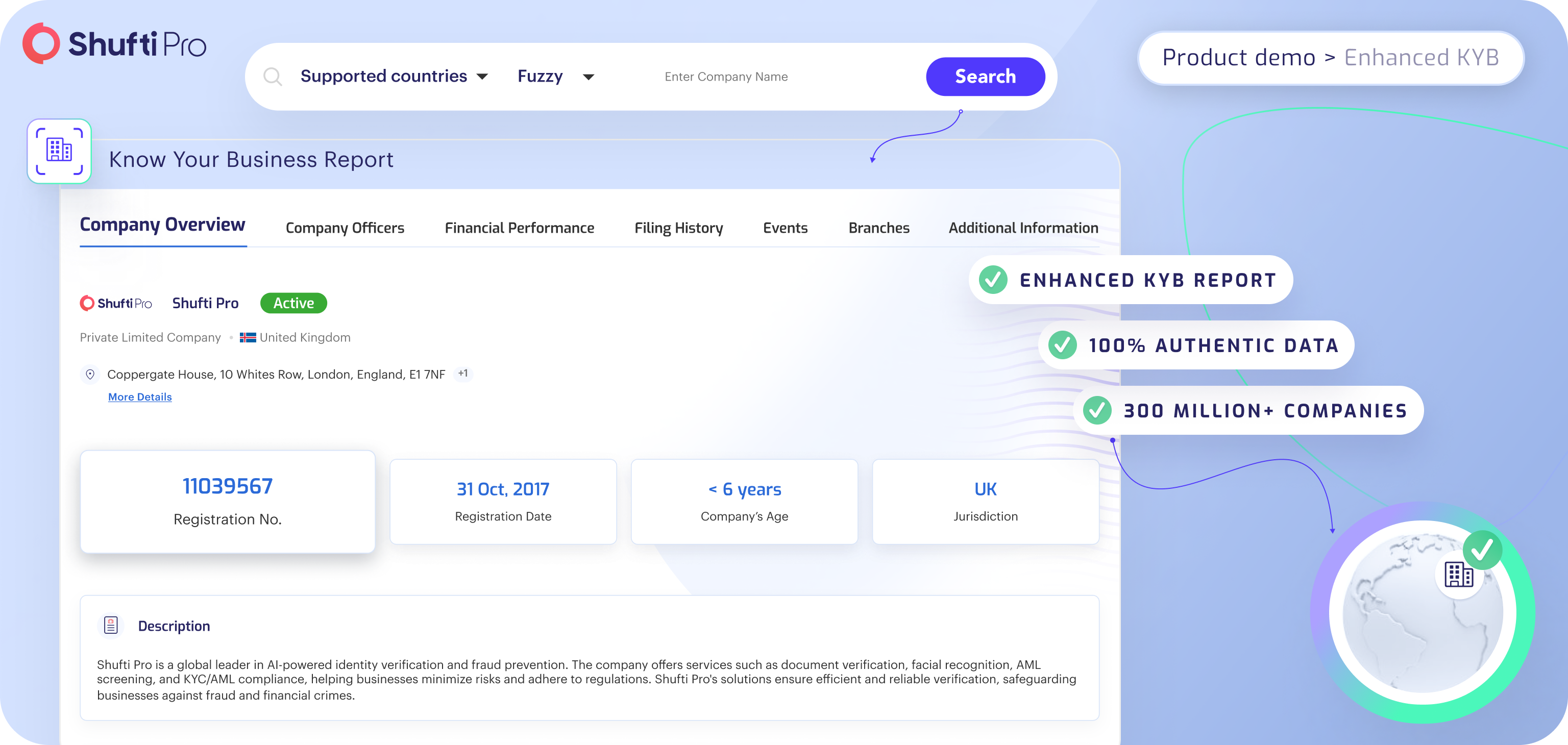
Configure Verification Settings: Merchants begin by selecting the verification type that fits their workflow:
- Onsite – Shufti generates a dedicated verification URL where the end user completes the verification in real time. Results are returned to the merchant upon completion.
- Offsite – The merchant provides business identity data directly. Shufti processes the information and returns the verification results without end-user interaction.
Choose Search Method: Enhanced KYB supports the following search inputs:
- Company Name
- Registration Number
Merchants can provide one or both inputs depending on what information is available.
Select Supported Countries: Merchants are required to provide the jurisdiction of the company. Shufti requires country as a mandatory field in order to initiate the search request. Check out the supported countries & states for enhanced kyb here.
noteTo process the request successfully, including the country in your request is mandatory.
Real-Time Verification and Report Generation: Upon submission, Shufti performs a live search across official business registries, trusted data sources, and proprietary databases for the selected jurisdiction. This real-time lookup fetches and cross-validates business information, ensuring high accuracy and compliance readiness.
After verification is complete, Shufti compiles a comprehensive KYB report containing:
- Company Name
- Company Registration Number
- Company Type
- Jurisdiction Code
- Registered Address
- Registry Information
- Company Status (Active, Dissolved, etc.)
- Company Officers / Directors
- Ultimate Beneficial Owners (UBOs)
- Organisational Structure
- Financial Performance Data
- Industry Codes
Data in the KYB report may vary depending on the information available on the respective business registry.
All KYB reports are stored for easy retrieval. Merchants can review, download, or share reports to support onboarding decisions, audit requirements, and ongoing compliance workflows.
AI Business Data Retrieval
When traditional registry-based verification returns insufficient or incomplete business data, Shufti's AI-powered retrieval offers an intelligent fallback. By scanning multiple alternative data sources simultaneously, the AI engine surfaces available business information that may not be captured through standard registry lookups. Shufti's AI aggregates and cross-references business data from across its data source network, compiles the findings, and generates a structured KYB report.
With enhanced KYB, the searched business can also be checked through AML. To do this, you need to pass an AML object. For details, check out Business AML Screening.
For companies that require to validate business documents, Shufti verifies the company's identity through official documents such as business registration certificates, incorporation documents, or tax filings. This verification method adds an extra layer of certainty, especially for businesses that may not be fully registered in standard business registries.
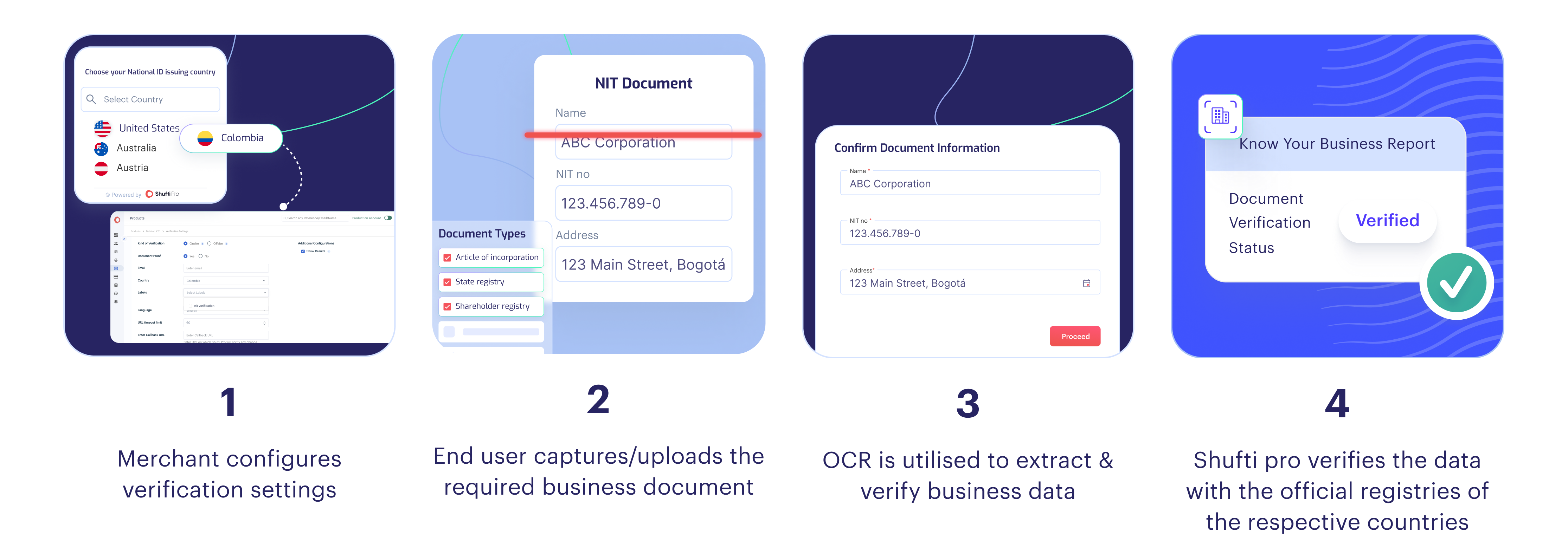
How It Works
Configure Verification Settings: Merchants begin by selecting the verification type:
- Onsite – Shufti generates a dedicated verification URL where the end user uploads the required business documents in real time. Results are returned to the merchant upon completion.
- Offsite – The merchant submits the business documents. Shufti processes the documents and returns the verification results.
Select Supported Country: Merchants select the country in which the business is registered. This ensures document validation is performed against the correct jurisdiction-specific requirements.
Upload Business Documents: Merchants may submit documents depending on jurisdiction requirements and the depth of verification needed.
Shufti's document based KYB supports a wide range of business documents throughout the globe. Here is the list of all supported documents covered in Shufti's coverage here.
Document Validation and Data Extraction: Shufti validates each submitted document for authenticity and integrity, checking for signs of tampering or forgery. OCR extraction is then performed to retrieve structured business information directly from the document.
Report Generation: After processing is complete, Shufti compiles a verification report containing the business information extracted and validated from the submitted documents.
All Document based Enhanced KYB reports are stored for easy retrieval. Merchants can review, download, or share reports to support onboarding decisions and ongoing compliance workflows.
If the document you require is not listed, please contact us at tech@shuftipro.com.
Enhanced KYB's Document Purchase functionality allows merchants to request and retrieve official business documents directly from official business registries. Merchants can initiate a document retrieval request and Shufti sources the required documents from the official business registries.
- Initiate a Document Purchase Request: Merchants submit a request specifying the company details and the documents required. The following information is needed to initiate the request:
- Company Name
- Company Registration Number
- Jurisdiction Code (ISO 3166-1 alpha-2 country code)
- Required Documents (e.g. Incorporation Certificate, Business Licence)
- Document Retrieval: Upon receiving the request, Shufti queries the official business registry of the specified jurisdiction and retrieves the requested documents. If the
required_documentsfield is left empty, Shufti treats all supported documents for that jurisdiction as required and retrieves them accordingly. - Report Generation: Once the documents are successfully retrieved, Shufti returns a structured response containing the retrieved document files. Each document entry includes:
- File URL (download link for the retrieved document)
- Document Title
- File Extension (PDF, JPEG, etc.)
API Response
Upon receiving the request, Shufti returns an initial acknowledgement response:
{
  "reference": "test-reference-01",
  "event": "request.received"
}
| Key | Type | Description |
|---|---|---|
| reference | String | The unique reference ID provided in the request. |
| event | String | Confirms the request has been successfully received and is being processed. |
Status Response
Once processing is complete, the full verification result can be retrieved via the status endpoint. Use the same authentication method as the initial request.
Status Endpoint: https://api.shuftipro.com/status
Status Request
{
  "reference": "test-reference-01"
}
Status Response Example
{
  "reference": "test-reference-01",
  "event": "verification.accepted",
  "verification_data": {
    "kyb": {
      "country_name": "united_kingdom",
      "registration_number": "test-registration-number",
      "company_filings": [
        {
          "file_url": "https://api.shuftipro.com/api/get-file/67ef002dc5b01f",
          "title": "incorporation_certificate",
          "file_extension": "pdf"
        },
        {
          "file_url": "https://api.shuftipro.com/api/get-file/67ef002dc5b01f",
          "title": "business_license",
          "file_extension": "jpeg"
        }
      ]
    }
  }
}
| Key | Type | Description |
|---|---|---|
| reference | String | The unique reference ID provided at the time of the request. |
| event | String | The final status of the verification request. |
| verification_data.kyb.registration_number | String | The official registration number of the company as recorded in the registry. |
| verification_data.kyb.country_name | String | The name of the country where the company is registered. |
| verification_data.kyb.company_filings | Array of Objects | A collection of retrieved document records, each containing a download URL, document title, and file extension. |
Supported Countries and Documents
Document availability varies by jurisdiction. Each country has a defined set of supported documents that can be requested. Any request containing document types outside of the supported list for the selected jurisdiction will be rejected.
Check out the full list of supported countries and documents for Document Purchase KYB here. To know more about the documents collection, contact us at tech@shuftipro.com.