Setup Guide for a New Client Admin
This page walks a new client admin through staffing TTM for the first time: adding reviewers, putting them on the right tier, and confirming a test transaction lands with the right person before you go live.
1. Enable TTM for your account
TTM is turned on per account by Shufti, alongside the Rule Builder — see Quick Start.
2. Create a sub-user for each reviewer
Go to Settings → Team Settings and click Add Team Member. Enter the reviewer's name and email, set a password (or use Auto Generate), and pick a Role for them in the same step.
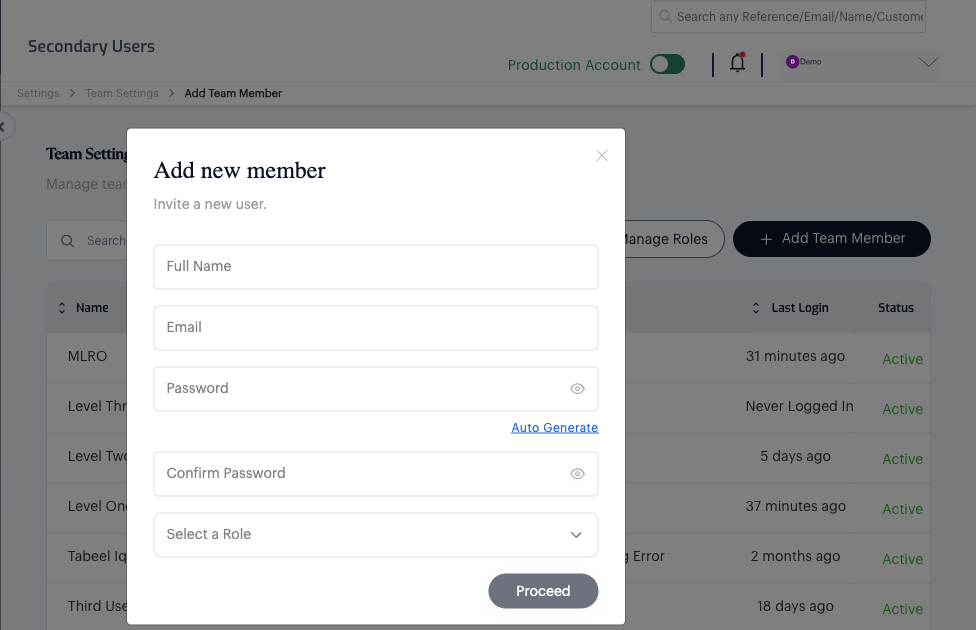
3. Give that role the right tier permission
A role needs two permissions for a reviewer to work the Alert Queue, both found under Settings → Roles & Permissions, in the Product category:
- Kyt Alert Queue — lets them open the Alert Queue screen at all
- One of Kyt Alert L1 / Kyt Alert L2 / Kyt Alert L3 / Kyt Alert Mlro — puts them on that specific tier
A role built for an L1 reviewer looks like this — Queue and L1 checked, the other three tiers left unchecked:
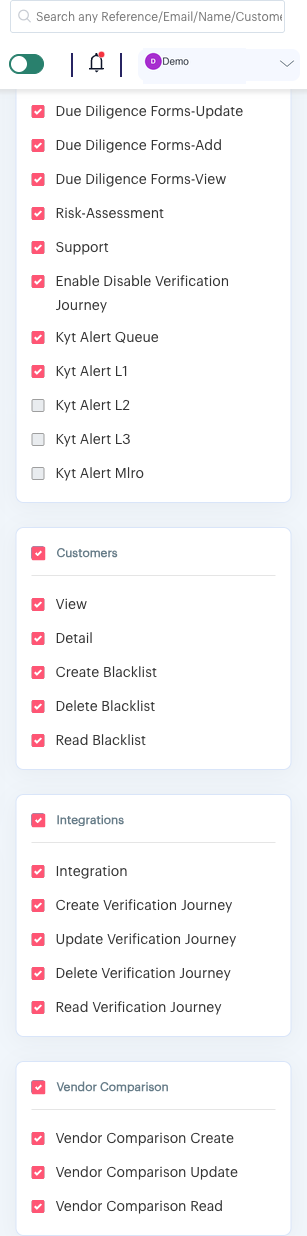
Only check one tier permission per role. A role is reusable, so you can create one role per tier (L1, L2, L3, MLRO) once and assign every reviewer on that tier the same role going forward.
4. Confirm the reviewer can see their tier
Have the reviewer log in and open the Alert Queue. Their Open Alerts count reflects only the alerts assigned to their tier, not the whole account's queue — a quick way to confirm the assignment took effect before you rely on it.
5. Send a test transaction
Submit a transaction designed to land in the tier you just staffed (see Transaction Lifecycle and Alert Routing and Review Tiers for how a score routes to a tier), then confirm it shows up for the reviewer you just configured.
Ready to Go Live
- Every tier your account uses (L1, L2, L3, MLRO) has at least one reviewer
- Each reviewer has signed in at least once
- A test transaction for each tier your rules can route to has been confirmed landing with the right reviewer
- Your rule sets are published, not sitting in Draft or In Review — rules created by an L1, L2, or L3 user need a reviewer to publish them before they take effect (see Review and Publish)
Troubleshooting
| Symptom | What to check |
|---|---|
| A reviewer sees no alerts at all | Confirm their role has Kyt Alert Queue and the correct tier permission checked — see step 3 |
| Alerts are routing but nobody seems to have them | Confirm at least one sub-user holds the tier permission that alert's score band routes to |