Overview
Shufti's Qualified Electronic Signature (QES) service enables businesses to collect legally binding electronic signatures from end users in compliance with the eIDAS Regulation (EU) 910/2014. QES is the highest legally recognised form of electronic signature under European law, equivalent to a handwritten signature in all EU member states.
Shufti orchestrates the full signing ceremony on behalf of the Merchant: identity proofing, qualified certificate issuance, document presentation, and signature collection. The service is powered by Evrotrust, an EU-regulated Qualified Trust Service Provider (QTSP), listed on the European Union Trusted List (EUTL).
Shufti supports two approaches to document signing:
- Upload Document: The Merchant uploads the document, and Shufti handles hash computation, signing, and embeds the signed hash into the PDF.
- Provide Document Hash: The Merchant computes the document hash and submits only the hash. Shufti returns a signed hash that the Merchant attaches to the document in their own environment. In this approach, the document never leaves the Merchant's environment.
When to Use QES
QES is required or recommended for use cases that require a high-assurance, legally defensible signature. Common scenarios include:
- Financial services: Loan agreements, investment mandates, account opening documentation requiring LoA High identity proofing.
- HR and employment: Employment contracts, consent forms, and offer letters that must be legally binding across EU jurisdictions.
- Real estate and legal: Property contracts, notarial acts, and legal instruments that require an equivalent to a wet signature.
- Healthcare: Patient consent forms and clinical documentation where regulatory requirements mandate a qualified signature.
- Regulated onboarding: Any onboarding flow where national or EU regulation explicitly requires a QES rather than an Advanced Electronic Signature (AES).
How It Works
Shufti's QES flow combines identity proofing, qualified certificate issuance, and signature collection into a single hosted end-to-end service. The Merchant triggers the flow via API; all subsequent steps are handled within Shufti's hosted verification environment.
1: Merchant initiates a QES request
The Merchant sends an API request to Shufti containing the document(s) to be signed or the hashes, the signatory's reference data, and a callback URL. Shufti validates the request and returns a hosted verification URL.
2: Signatory is redirected to the Shufti-hosted flow
The end user opens the hosted URL via iFrame, redirect, or in-app browser. The entire identity proofing and signing ceremony takes place within this environment.
3: Identity proofing is performed
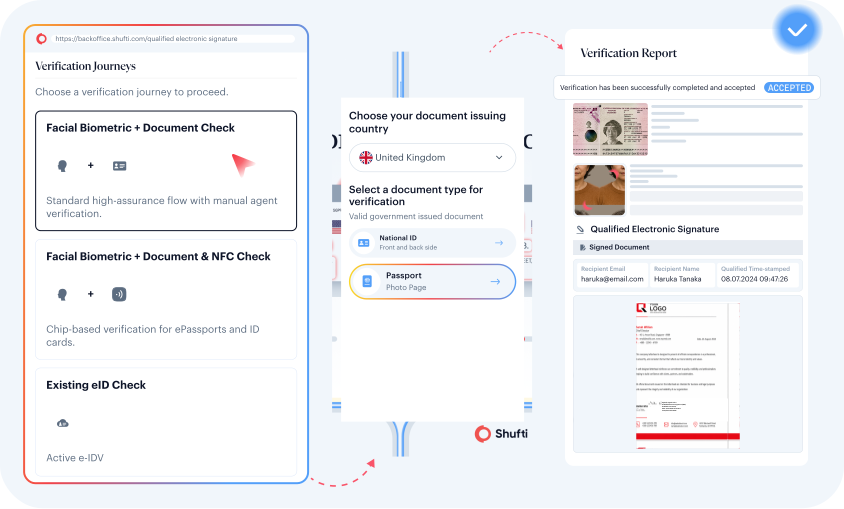
Shufti verifies the signatory's identity using one of the supported verification methods: Document + Biometrics, NFC chip reading, or eID-based verification.
4: QTSP issues a qualified certificate
Once identity proofing is complete and confirmed, Evrotrust (the QTSP) issues a one-time qualified certificate bound to the verified signatory. This certificate is used exclusively for the current signing event.
5: Signatory reviews and signs the document
The document is presented to the signatory within the hosted flow. The signatory authenticates using the QTSP-issued certificate and applies the QES. All pages of the document are presented before signing can proceed.
6: Signed document and evidence package are returned
For document upload requests, Shufti delivers the signed document with an embedded QES. For hash submission requests, Shufti delivers a detached qualified signature for each submitted hash. In both cases, the qualified certificate, identity proofing evidence, and full audit trail are included alongside the signature(s), delivered to the Merchant's callback URL and available via the API response.

QES supports Onsite verification only. There is no Offsite flow — the end user must complete the signing and identity steps through the Shufti hosted flow.
Supported Identity Verification Methods
Shufti supports three identity proofing methods for QES. Each maps to a specific procedure under ETSI TS 119 461 v1 and satisfies the LoA requirement.
- Document Verification + Facial Biometrics: The signatory captures their government-issued ID (ID Card or Passport) and completes an active liveness check. Shufti's AI engine verifies document authenticity, extracts identity data via OCR, and performs a face match against the document photograph.
- NFC Document Verification + Facial Biometrics: Where the signatory's device supports NFC and the identity document contains an ICAO-compliant chip, Shufti reads identity data directly from the chip using BAC/PACE protocols. NFC reading eliminates optical capture limitations and provides a higher-fidelity proofing signal by reading data directly from the issuing authority's chip.
- Active eID-Based Verification: The signatory authenticates using an active eID scheme from a Shufti-supported eIDAS-notified scheme. Identity data is retrieved directly from the eID's secure element, bypassing manual document capture entirely. This is the preferred method in markets with mature eID infrastructure.
Supported Identity Documents
The following identity documents are accepted for QES identity proofing. For NFC-based proofing, the document must contain an ICAO-compliant chip and the signatory's device must support NFC.
- National Identity Card
- Passport
- NFC-enabled ID cards and passports
Supported eID Schemes
All schemes listed below are eIDAS-notified and carry a Level of Assurance of Substantial and High (LoA Substantial/High).
| Country | eID Scheme | Level of Assurance |
|---|---|---|
| Austria | ID Austria | High |
| Bulgaria | Evrotrust eID | Substantial & High |
| Czech Republic | MojeID | Substantial & High |
| Denmark | MitID | Substantial & High |
| Estonia | iD KAART | High |
| France | France Identité | High |
| Italy | SPID | Substantial & High |
| Latvia | eParaksts Smart Card | Substantial & High |
| Norway | BankID Norway | High |
| Sweden | Swedish BankID | Substantial & High |
For country-wise coverage of supported document types and eID schemes available through the Identity Verification (IDV) methods within the QES solution, please refer to the QES Coverage section
Verification Report
Every QES transaction generates a verification report accessible via the Shufti backoffice and the API response. The report contains the complete record of the identity proofing and signing session. Merchants should retain this report for audit and compliance purposes. The signed document can also be downloaded directly from the report, and a copy can be received via email.
The QES verification report contains the following information:
| Report Section | Contents |
|---|---|
| Verification Summary | Verification status (Accepted/Declined), Reference ID, Customer ID, email, timestamp, timezone, language, processing time, browser info (IP, location, device, browser version), use case, verification services used, achieved LoIP, Level of Assurance. |
| Device IP and Network Risks | IP address, geolocation (continent, country, city), IP timezone, coordinates, ASN number, ASN name, routing type, risk score, and individual checks: datacenter detection, proxy detection, tor detection, VPN detection, document and IP country match, IP and timezone match, emulated device detection, device jailbreak detection, frequent IP changes detection. Device fingerprint with Visitor/Fingerprint ID. |
| Browser Details | Browser timezone, current time, OS name, user agent, threat level. |
| Facial Biometrics Verification | Check results for: selfie capture, deepfake detection, document in hand verification, face liveness. Face image with metadata (size, device, capture mode, DPI, resolution, format, mimetype, created timestamp). |
| Document Verification | Individual check results for: Document Originality, Visual Integrity, Issue Date on Document Match, Security Features Detection, Expiry Date on Document Match, Document Sides Consistency, Document Type Consistency, Selfie and Face on Document Match, Name Match on Document, DOB on Document Match, Document Expiration, Document Issuing Country, Document Number Match. |
| Document Extracted Data | Full Name, Document Type, Country, Date of Birth, Age, Expiry Date, Issue Date, Document Number, etc. |
| Document Images | Front side and back side document images with metadata per image: size, device, capture mode, DPI, resolution, format, mimetype, created timestamp. |
| Email MFA Verification | Email address validation status, email OTP authentication status, email address. |
| Qualified Electronic Signature | Signer Name, Certificate Issuer (Evrotrust), Serial Number, Valid From, Valid To, Qualified Time-Stamped timestamp. Signed document file with status badge. For document upload requests: the signed PDF (PAdES signature with long-term validation data embedded, verifiable with any standard PDF signature validator) is available for download from the report and can be shared via email. For hash submission requests: the detached qualified signature (PKCS#7/CAdES) for each submitted hash is returned in the API response. |
| Video Recording | Full video recording of the verification journey with frame-by-frame thumbnails. |
| Face Match Score | Match score percentage between selfie and document photo, side-by-side comparison of face image and document front side with metadata. |
| Verification Timeline | Timestamped event log showing each step: Verification Initiated (with device, location, IP), Consent Accepted, Device Switched (if applicable, with new device details), Document Submission (document type, capture mode), Face Submission (capture mode), QES Submission (upload status), Ready for Processing, Approved (with total processing time). Each event includes a timestamp, device, location, and IP address. |
| General Data | Verification Mode, Verification Type (Onsite), etc. |