Transaction Monitoring API: How It Works
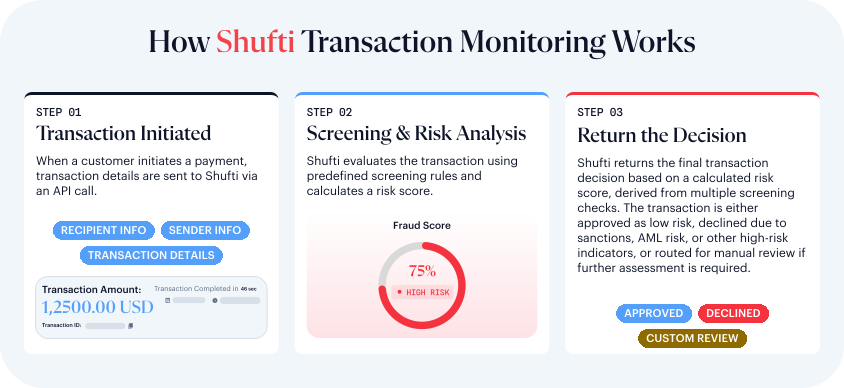
Shufti's Transaction Trust Monitoring solution is designed to automatically monitor and assess financial transactions for potential risks, including money laundering, fraud, and non-compliance with regulations. The solution prioritises the detection of suspicious activities related to money laundering, ensuring that every transaction is rigorously screened in real time.
By using advanced algorithms, real-time data processing, and integration with global sanctions and risk databases, Shufti identifies and flags potential risks while helping payment service providers maintain compliance and reduce manual oversight.
Overview
Four modules work together, end to end:
- Configure. Your compliance team builds detection rules in the Rule Builder, grouped into rule sets, and backtests them before publishing.
- Screen. Every transaction is scored and checked against your published rules the moment it's submitted. See Transaction Lifecycle for what happens between submission and decision.
- Review. A transaction that triggers a rule becomes an alert, routed to a review tier by its score band — see Alert Routing and Review Tiers — and worked through Alert Management.
- Report. Where an investigation confirms suspicious activity, a compliance user prepares a regulatory report; only the MLRO can approve it for filing. See Regulatory Reporting.
- Audit. Every rule change, alert action, and report status change is recorded in the Audit Trail.
Who Uses TTM
- Compliance Officers — your team members holding an L1, L2, or L3 review-tier permission. They build and maintain rules in the Rule Builder, work the Alert Queue for their tier (review, request information, escalate, or close within their tier's limit), and draft regulatory reports for the MLRO to approve.
- The MLRO (Money Laundering Reporting Officer) — the most senior review tier. Only the MLRO can approve a regulatory filing. Every sanctions-match alert goes to the MLRO whatever its score, and the MLRO can close an alert alone at any score, up to the account's highest value ceiling.
- Developers — the technical integrator on your side, working entirely against the API rather than the Back Office. They submit transactions, read back the score and evidence, handle the decision returned, and look transactions up later for support or reconciliation. See Offsite Integration for the full request/response reference.
Data Sources & Enrichment
Key Data Points Used
- Transaction amount and frequency
- Customer risk level
- Country indicators (IP, account, beneficiary, recipient)
- Sanctions lists
- Bank account details (IBAN, bank, country)
- Behavioural metrics (velocity, dormancy, cumulative value)
For the full set of fields TTM accepts and computes, see Complete List of Datapoints and Complete List of Attributes.
Rule Builder
The Rule Builder lets your compliance team create and manage transaction monitoring rules directly in the Shufti Back Office. Rules can be configured step by step or generated with AI from a short set of questions about your industry, products, and risk appetite. Every rule must be tested and approved before it goes live.
Rule Typologies
Each rule is linked to a typology representing the type of financial crime it is designed to detect. Typologies help your compliance team understand which risks are covered and make it easier to filter, organise, and review rules by risk category.
Supported typologies include:
- Account Takeover
- Agent Abuse
- Channel Abuse
- Structuring
- Terrorist Financing
Each rule is also categorised as AML or Fraud (its discipline) so its alerts are routed to the right team.
Typologies, rule sets, and thresholds can be customised to meet each client's compliance programme and industry requirements.
Rule Sets
Rules can be grouped into rule sets based on their purpose, customer type, or business line. For example, you can maintain a dedicated rule set for high-risk customers, such as politically exposed persons, so they are assessed against stricter monitoring requirements.
Rule Configuration
Each monitoring rule consists of the following components:
- Conditions: One or more checks applied to transaction data. A condition can evaluate a single value, such as the transaction amount; activity over a defined time window, such as new beneficiaries added within one hour; or a change from the customer's usual behaviour, such as comparing the average transaction amount for the current week with the previous 90-day average.
- Priority: Sets the rule's priority to Low, Medium, or High. When more than one rule matches the same transaction, priority decides which one's decision wins — a High-priority rule always takes precedence over Medium or Low, whatever actions they carry. See KYT Rule Builder for the full precedence order.
- Decision: The action taken when the rule is triggered — Approve, Decline, Manual Review, or Watch. See Declined Reasons for how to find out why a transaction was declined.
Testing and Publishing
Before publication, rules can be backtested against a date range you choose — hours, days, months, or a custom window. Backtesting shows how many alerts a rule would have generated, the value involved, and how much it overlaps with other rules, so your team can judge a rule's impact before it goes live.
All new rules and rule changes must be approved by a second compliance user before going live. Every change is recorded in the audit trail to maintain accountability and support regulatory reviews.
Alert Management
When a transaction triggers one or more monitoring rules, Shufti generates an alert for review in the Back Office.
Alert Scoring
Each alert receives a risk score from 0 to 100 and is assigned to one of three risk bands: Low, Medium, or High.
Alert Assignment
A scored transaction is routed by two independent gates: an auto-approve check, then — for anything that doesn't auto-approve — a score band and a sanctions override.
- Auto-approved (no reviewer): A transaction whose rules all approve (or that triggers no rule at all) and whose score falls at or below the auto-approve ceiling — 30 by default — is approved automatically and never reaches a queue.
- Score band routing: Everything else is routed by its score band — Low (0–40) to L1, Medium (41–70) to L2, and High (71–100) to L3 — except that within the High band, a score of 91 or above goes to the MLRO instead of L3. A score of, say, 35 that doesn't qualify for auto-approval still falls in the Low band and goes to L1.
- Sanctions override: A confirmed or partial sanctions list match is always routed to the MLRO, whatever the score.
The auto-approve ceiling and score bands are defaults Shufti configures for your account if you don't specify your own; they can be configured to match your risk appetite.
Users can only view and act on alerts permitted by their assigned role. Each review tier has a defined service-level agreement (SLA) measured from when the alert is created — escalating an alert does not restart it (see Alert Routing and Review Tiers) — and alerts approaching their deadlines are highlighted so teams can prioritise outstanding work.
Alert Details
Each alert consolidates the information needed for investigation and decision-making into a single view:
- Alert Summary: The risk score, discipline, assigned tier, and applicable SLA.
- Transaction Details: The transaction that triggered the alert, including the amount, currency, payment method, and the bank details of the parties involved (IBAN/BIC, card country and brand).
- Customer and Beneficiary: The customer's and beneficiary's identity details, AML/sanctions screening status, and the customer's most-used device and access location.
- Rules Triggered: Each triggered rule, the conditions it evaluates, and the transaction value or activity that matched those conditions.
- Risk Signals: A comparison of the transaction against the customer's 90-day behavioural baseline — amounts, frequency, corridors, beneficiaries, and devices. Each signal is classified as positive, neutral, or risk-related. Signals provide context for an alert but do not generate alerts independently.
- Linked Transactions: The customer's other recent transactions and their associated alert statuses.
- AI Compiled Summary: A plain-language explanation of why the alert was generated, a low/medium/high false-positive likelihood band, and suggested next steps.
- Audit Trail: Every action taken on the alert, including who took it and when.
The AI summary is advisory only. It cannot take action on an alert, and the final decision always remains with the reviewer.
Alert Investigation (Case Actions)
Reviewers can investigate and resolve alerts directly from the alert view:
- Request Information: Requests additional details from the customer, such as proof of source of funds. The SLA is paused until the customer responds.
- Escalate: Moves the alert to the next review level with a written justification.
- Reassign: Transfers the alert to another reviewer.
- Close as False Positive: Closes the alert when the activity is determined not to represent a genuine risk. The outcome feeds into rule performance data your compliance team can review.
- Close as Resolved: Closes the alert after investigation when no further action is required, with a documented resolution and justification. SAR/STR reporting is a separate workflow, and an alert can be resolved without a filing.
- File SAR / STR: Initiates a regulatory report using the information already attached to the alert.
Each action is restricted by the user's role and recorded in the audit trail.
Regulatory Reporting
The Regulatory Reporting module lets you prepare, review, approve, and file reports with the relevant Financial Intelligence Units (FIUs).
Report Types
- Suspicious Activity/Transaction Reports (SARs/STRs): Created by a compliance user when an investigation confirms suspicious activity.
- Threshold and currency reports (CTR, LVCTR, LCTR, IFTR, EFTR, CDR, and equivalents): Generated from transactions that cross a jurisdiction's reporting threshold. Which report types apply, their thresholds, and their filing cadence are jurisdiction-specific — a deposit that creates one report type and clock in one country can create a different type and clock in another.
Report Creation
Reports can be created directly from an alert, or as a standalone filing with no alert, in which the MLRO enters the subject and details manually. See KYT Regulatory Reporting for the steps.
When a report is created from an alert, the customer's identity and the associated transaction details are populated and locked, so the evidence stays consistent with the original alert.
The report narrative and suspicious activity indicators are pre-populated and can be edited by the authorised user. Before submission, each report is validated against the relevant FIU's required fields and formatting rules.
Review and Approval
Analysts prepare reports and submit them for review. Only the MLRO can approve a report for filing.
If changes are required, the MLRO returns the report to the analyst with an explanation. The analyst updates the existing report and resubmits it for approval.
No report can be submitted to a regulator without MLRO approval.
Submission and Export
Approved reports are generated as a structured export in the format the relevant FIU's form specifies, and submitted by the MLRO to the appropriate authority.
This is a structured export, not a schema-validated file. None of Shufti's six supported regulators publishes a schema we can validate against, so the export is not — and must not be presented as — a certified goAML (or equivalent) submission file.
Filed reports remain accessible in a plain-language format, and the corresponding submission file can be downloaded at any time.
Filing Status
Each report can be tracked from its initial creation until the FIU responds. The available statuses are: Draft, Assigned to MLRO, Returned to analyst, Ready to download, Filed, Pending Information, Accepted by [regulator], Partially Accepted, Rejected by [regulator], and Case Closed. The accepted/rejected statuses name the actual regulator for that report's jurisdiction — for example "Accepted by FINTRAC" for a Canadian filing.
Supported FIUs currently include Canada (FINTRAC), United States (FinCEN), South Africa (Financial Intelligence Centre), Saudi Arabia (SAFIU), United Arab Emirates (UAE FIU), and Suriname (FIU Suriname). Retention period for filed reports and their status history is jurisdiction-specific: 5 years (US, Canada, South Africa), 6 years (UAE), 7 years (Suriname), or 10 years (Saudi Arabia).
Audit Trail and Record Retention
The audit trail provides a chronological record of activity across transaction monitoring, alert management, and regulatory reporting.
The system records every rule change, alert action, and report status change, including who performed it and when. These records support accountability, internal investigations, and regulatory audits.
Filed reports and their status history are retained in accordance with the applicable record-retention policy.