Role-Based Access Control (RBAC)
Overview
The Role-Based Access Control (RBAC) feature allows administrators to manage user roles and permissions effectively within the back office. This ensures that team members have the appropriate access levels for their tasks, promoting security and collaboration.
Features
- Pre-defined Roles: Five pre-configured roles are available for immediate use.
- Custom Roles: Administrators can create roles that are tailored to specific organizational needs.
- Permissions Management: Permissions are assigned to each role, controlling access to various sections of the back office.
- Centralized Role Management: All user roles and permissions can be managed from one central location, simplifying access control.
- Customizable Access Control: Roles can be tailored to match the unique requirements of your team and organization, providing granular control over user permissions.
Configuration Process
Follow the steps below to configure RBAC in the back office:
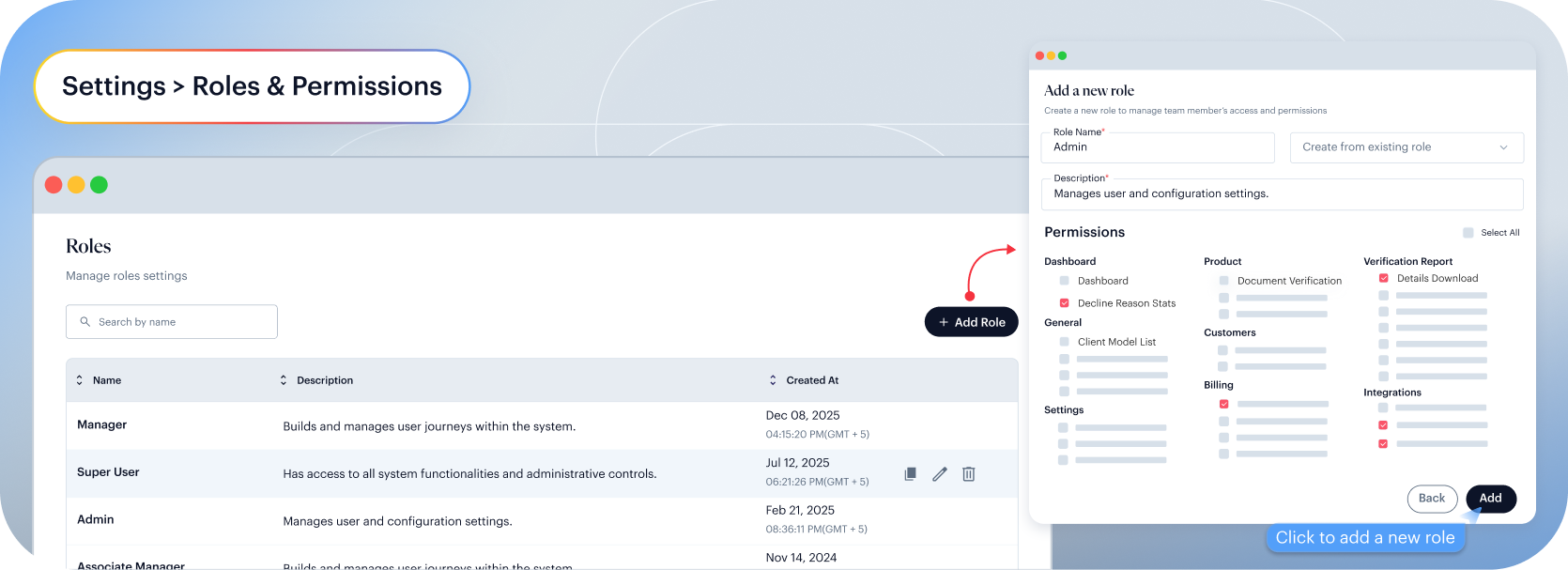
1. Access Roles & Permissions
- Navigate to the Settings section from the back office dashboard.
- In the settings menu, select Roles & Permissions.
2. Review Pre-defined Roles
Upon accessing the Roles & Permissions section, you will see five pre-defined roles available for immediate use:
- Admin
- Super User
- Manager
- Review Agent
- Advanced Agent
These roles can be assigned directly to users without any additional configuration.
3. Create Custom Roles (If Needed)
To create a custom role:
- Click on the "New Role" button.
- In the pop-up window, provide the following details:
- Role Name: Choose a descriptive name for the role.
- Role Description: Provide a brief description outlining the role's responsibilities and permissions.
- Select the appropriate permissions for the role. Permissions control access to various sections of the back office, ensuring that users with this role can access only the relevant features.
- Click "Add" to save the new role.
Once created, the custom role will be available for assignment to users, providing tailored access control based on your organization's specific requirements.